
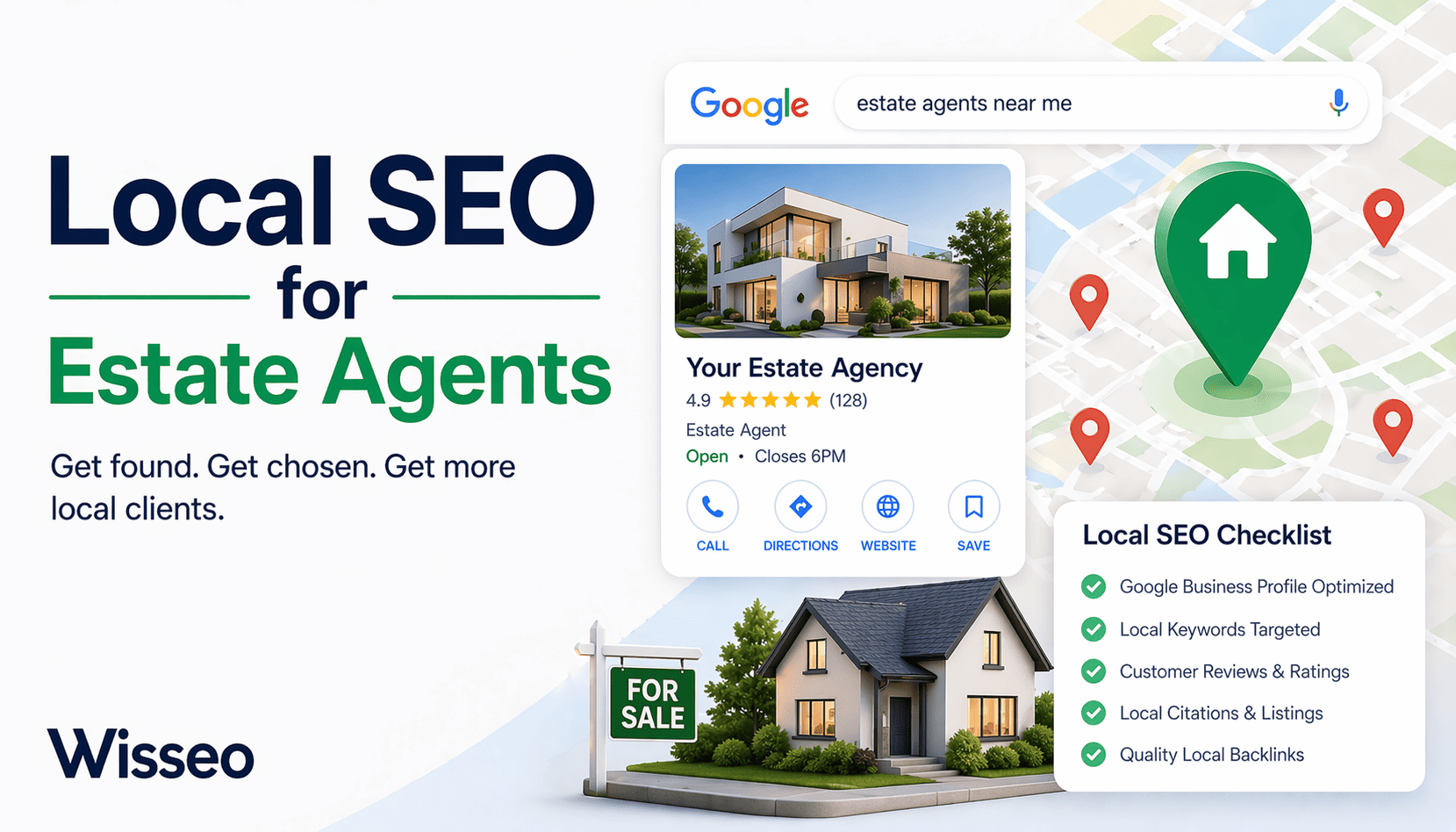
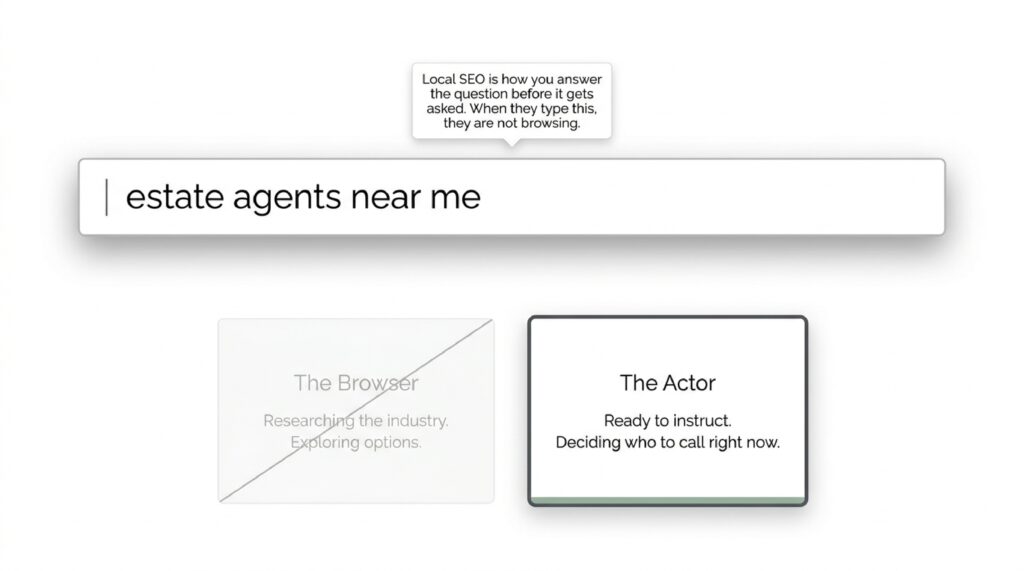
When someone in your town types “estate agents near me” into Google, they have already decided they want an agent. They are not browsing. They are not researching the industry. They are about to call someone, and the question is whether that someone is you or the competitor two streets over.
Local SEO is how you answer that question before it gets asked.
Most estate agents have a website. Most have a Google Business Profile of some kind. Most have collected a handful of reviews over the years. None of that is enough if the profile hasn’t been set up properly, if the reviews are six months old, or if the website has no pages targeting the specific towns and postcodes where the agency operates.
This guide covers the mechanics: what to fix, what to build, and what to stop ignoring. If you’re newer to the subject and want a broader foundation first, the step-by-step SEO guide for 2026 covers the underlying principles. This article assumes you’re past that stage and ready to apply them to a specific local context. No theory about “the digital landscape.” Just the work.
Local Estate Agency SEO Opportunity CheckerPrioritize GBP, area pages, reviews, and local content based on your starting point. Open tool
Local signals
Check the foundations your agency already has in place.
Local opportunity
There is room to win local searches if you organize location, reviews, and area pages.
Part 1: Your Google Business Profile Is the First Showing. Treat It Like One
A Google Business Profile (GBP) is the panel that appears on the right side of Google search results when someone searches for your agency by name, and more importantly, the listing that appears in the local map pack when someone searches for estate agents in your area. That map pack sits above the organic results. It is the first thing most people see.
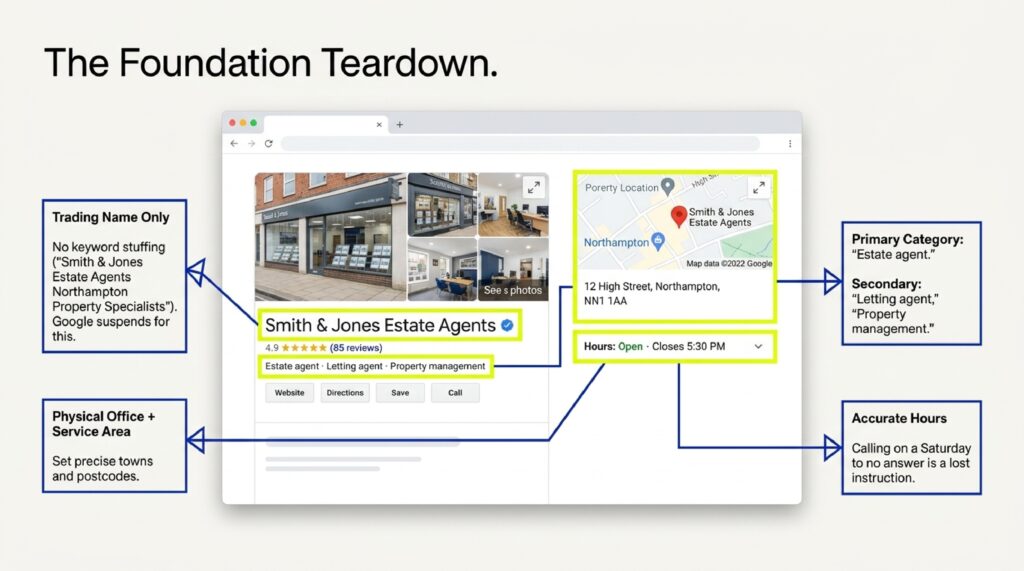
Most estate agents have claimed their profile. Fewer have filled it out properly.
What “properly” means:
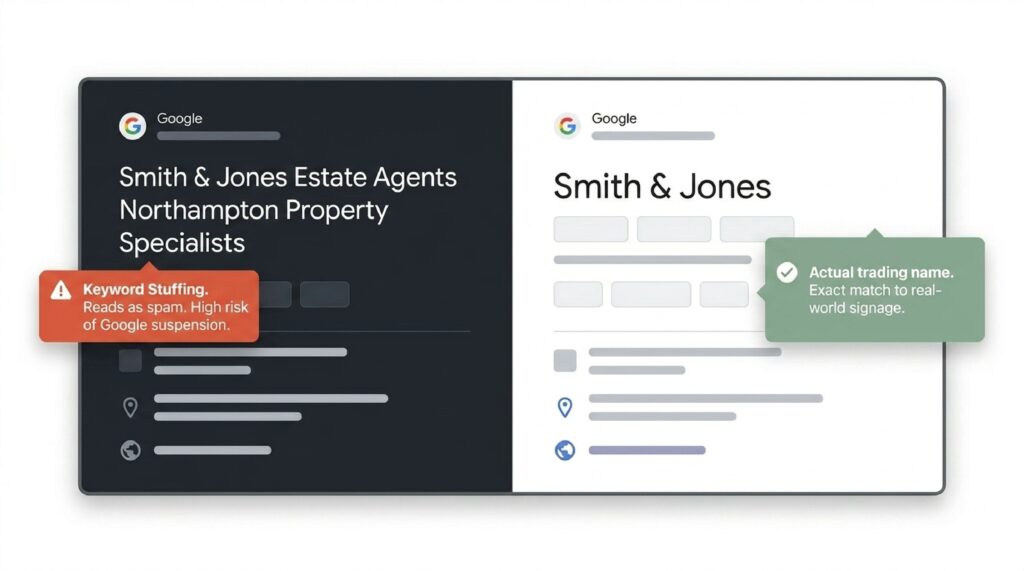
Business name. Use your actual trading name. Do not keyword-stuff it (“Smith & Jones Estate Agents Northampton Property Specialists”). Google can suspend listings for this, and it reads as spam to anyone who sees it. Google’s own GBP guidelines are specific about what constitutes a policy violation.
Categories. Your primary category should be “Estate agent.” Add secondary categories where relevant: “Letting agent,” “Property management company.” Categories determine which searches your listing is eligible to appear in. Getting this wrong means missing searches you should be winning.
Address and service area. If you have a physical office, add the address. Also set a service area: the towns, villages, or postcodes you actively cover. Google uses this to decide whether to show your listing to people searching in those locations.
Phone number and website. These need to match what’s on your website and what’s listed in every other directory. Consistency matters. More on that in Part 3.
Opening hours. Keep them accurate. If someone calls on a Saturday and gets no answer because your hours say you’re open, that’s a lost instruction.
Photos. Add them. Google’s own data shows listings with photos receive more direction requests and website clicks than listings without. Use real photos of the office, the team, and properties (with consent). Not stock images of handshakes.
Posts. The GBP Posts feature lets you publish short updates directly to your listing. New instruction. Recent sale. Market update. A post takes ten minutes and keeps the profile looking active. Google notices activity.
The Q&A section. Most agents ignore this. Anyone can post a question to your listing, and anyone can answer it. Seed it yourself: post the three or four questions you get asked most often (“Do you charge upfront fees?” “Do you cover [town]?”) and answer them. This controls what potential clients read before they’ve spoken to you.

There is a broader point worth understanding here: GBP is one of the clearest examples of a zero-click surface, a place where Google answers the user’s question without them visiting any website. Understanding how zero-click search affects visibility helps clarify why the profile itself needs to carry complete, accurate information rather than just pointing people toward your site.
The GBP is not a set-and-forget asset. It needs attention: reviews responded to, photos updated, posts published. Think of it the same way you think of a window display. If it hasn’t changed in four months, it looks like no one is minding the shop.
Part 2: Why “Estate Agents in [Town]” Beats “Best Property Experts in the UK”
Keyword research for local SEO is not complicated. It requires honesty about how people actually search.
People looking for an estate agent type things like “estate agents in Harrogate,” “sell my house Harrogate,” “estate agents near me,” “letting agents Harrogate.” They do not type “premier property professionals delivering exceptional client journeys.” That language exists on agency websites, not in search bars.
Finding the terms worth targeting
Google Search Console shows what searches are already bringing people to your site. If you don’t have it set up, do that first. It’s free and takes fifteen minutes. Look at the queries report. You will likely find a handful of searches where your site appears but ranks poorly (positions 8-20). Those are the terms worth working on first, because you’re already relevant. You just need to push. If you want a structured way to work through that data, the GSC and Sheets audit template gives you a repeatable process without needing to buy additional tools.
Google’s autocomplete and “People also ask” features show you how searches cluster. Type “estate agents in [your town]” and watch what Google suggests. Each suggestion is a real search pattern with real volume.
Where to use these terms
The target term for each page goes in five places: the page title tag, the H1 heading, the meta description, the first paragraph of body copy, and the URL slug. This is not about stuffing. One natural use in each location is enough. The rest of the page should read like it was written for a person, not an algorithm. For a detailed look at how meta tags interact with keyword placement-
What most agency websites get wrong
The homepage tries to rank for everything and ranks for nothing. One page, one primary keyword. If you cover multiple towns, each town needs its own page. A homepage targeting “estate agents” cannot also rank competitively for “estate agents Knaresborough,” “estate agents Ripon,” and “estate agents Wetherby.” Those terms need individual pages, and those pages need actual content, not three sentences and a contact form.
Search intent matters more than search volume
“Estate agents in Harrogate” has commercial intent: the person is ready to act. “Average house prices Harrogate 2024” has informational intent: the person is researching. Both are worth targeting, but they need different pages and different content. A blog post serves the second. A service page serves the first. Mixing them produces a page that satisfies neither.
Part 3: Citations. The Boring Work That Separates Page One from Page Three
A citation is any online mention of your business that includes your name, address, and phone number. Google uses citations to verify that a business is real and that the information it holds about that business is accurate.
The problem most agencies have is not that they have no citations. It’s that they have inconsistent ones.
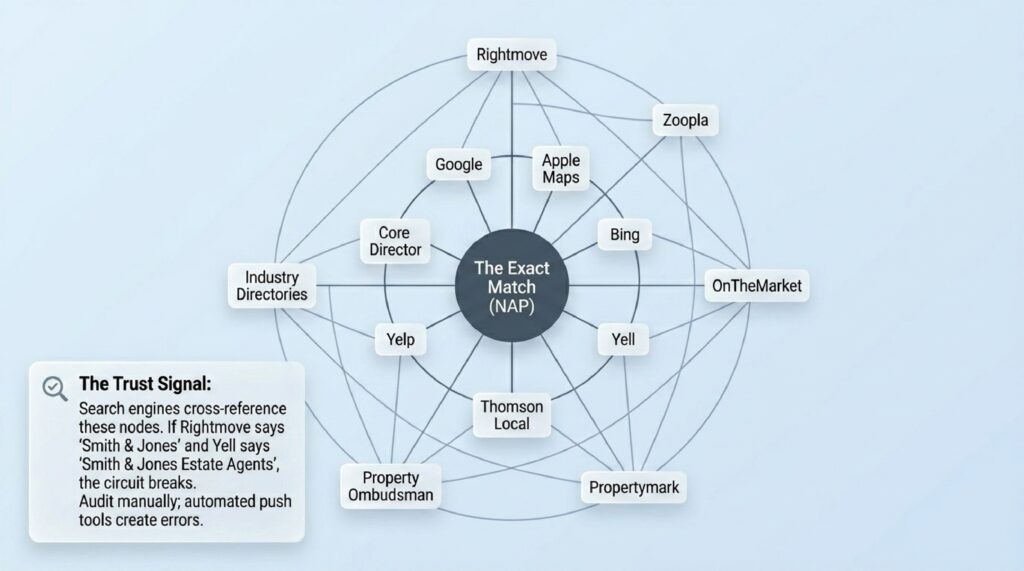
Your agency listed on Rightmove as “Smith & Jones” but on Yell as “Smith and Jones Estate Agents” and on your own website as “Smith & Jones Properties Ltd” looks like three different businesses to a search engine. Each inconsistency dilutes the trust signal that citations are supposed to send.
The core directories
These are non-negotiable: Google Business Profile (covered in Part 1), Bing Places for Business, Apple Maps, Yell.com, Thomson Local, Yelp UK, The Property Ombudsman directory (if you’re a member, and you should be), ARLA Propertymark (for lettings), and NAEA Propertymark (for sales).
Get these right first. Exact match on name, address, and phone number across all of them. If your office has moved, an old address sitting in fifteen directories is actively working against you.
Industry-specific directories
Estate agents have directories that generic businesses don’t: Rightmove, Zoopla, OnTheMarket, PrimeLocation. You’re likely already listed. Check that the contact details match your GBP exactly.
Local directories matter too. The local newspaper website, the town’s business directory, the chamber of commerce member list. These carry geographic relevance that a national directory can’t replicate.
How to audit what you have
Search for your agency name in quotes. Go through the first five pages of results. Note every listing that has your details and check whether the information is current. This takes an afternoon. Do it once, fix the errors, then set a reminder to check again when anything changes: phone number, address, trading name. Moz Local can accelerate the audit phase if you’re managing several locations, though the manual check still catches things automated tools miss.
There is no shortcut that works reliably. Automated tools that promise to “push your listing to 200 directories” often create as many problems as they solve. Manual is slower. It’s also right.
Part 4: Local Landing Pages That Convert. Not Just Exist
If your agency covers six towns, you need six location pages. Not six copies of the same page with the town name swapped in. Six pages with distinct, useful content about each area.
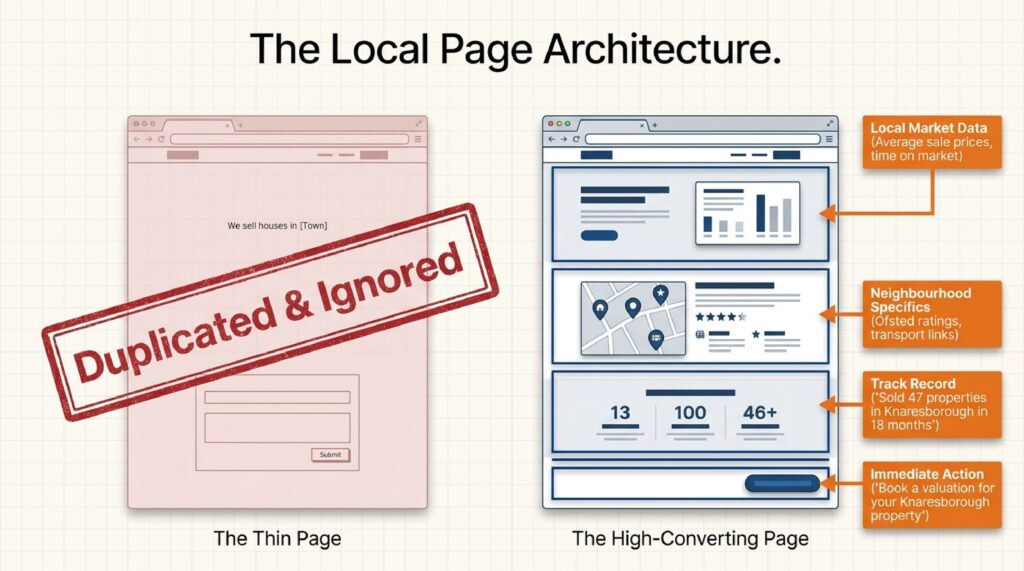
The distinction matters because Google can identify thin, duplicated content. A page that says “We are estate agents in Knaresborough. We sell houses in Knaresborough. Contact our Knaresborough team today” contains nothing a person in Knaresborough would find worth reading. It ranks poorly because it deserves to.
What a location page should contain
Local market data. Average sale prices in the area. How long properties typically sit on the market. Which types of property move fastest. This information changes, so update it. A page showing 2021 data in 2025 signals neglect.
Neighbourhood specifics. Schools that serve the area (Ofsted ratings matter to buyers). Transport links. What the local high street looks like. How long the commute to the nearest city takes. This is information buyers are actively trying to find, and putting it on your page means they find it through you.
Your track record there. Properties you’ve sold in the area. Instructions you’ve taken. A number, “we’ve sold 47 properties in Knaresborough in the last 18 months,” tells a prospective client something useful. A testimonial from a local vendor carries more weight than a generic five-star review with no location context.
A specific call to action. Not “contact us.” “Book a free valuation for your Knaresborough property” or “See what we’re currently selling in the Knaresborough area.” Specific beats general.
Internal linking. The location page should link to relevant properties you have listed in that area and to your core service pages. This keeps visitors on the site and helps Google understand what the page is about.
The length question
A location page should be as long as it takes to cover the above properly. For most towns, that’s 600 to 900 words. Longer is not better. A 2,000-word page that fills half its length with generic boilerplate about “the property market in today’s challenging environment” is worse than a 700-word page that stays specific.
One thing that kills these pages
Burying the contact option. If someone has read your page about their town, found it useful, and wants to book a valuation, the path to doing that should take one click. Not a trip to the main navigation, not a scroll to the footer. A form or a phone number, visible on the page, before they have to go looking.
Part 5: Reviews. The System That Gets Them
A five-star average with six reviews does not carry the same weight as a four-point-eight average with 140 reviews. Volume matters. Recency matters more. A Google Business Profile where the last review was posted fourteen months ago looks like an agency that stopped caring, or stopped trading.
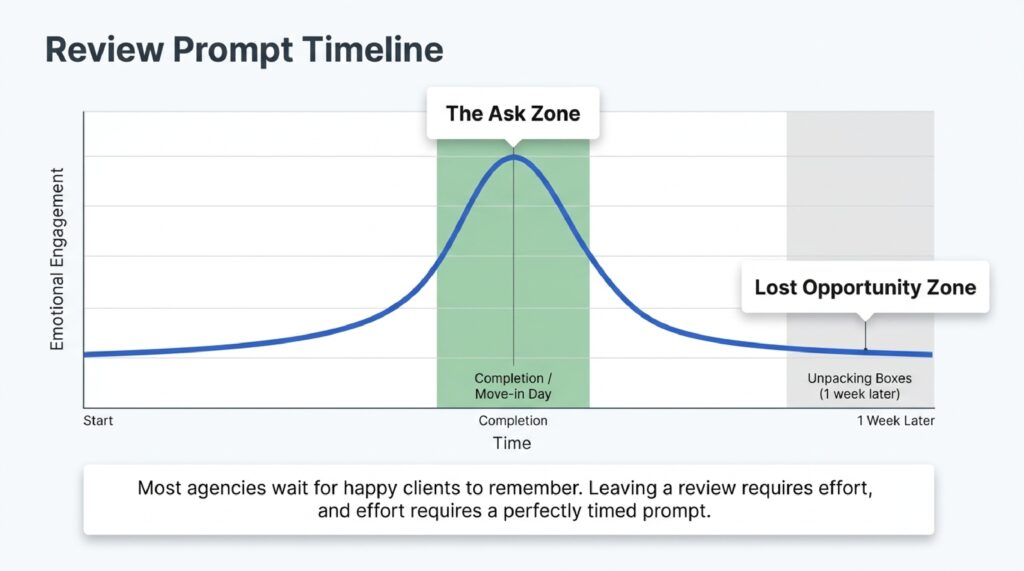
Most estate agents get reviews the same way: they wait for happy clients to remember. Some do. Most don’t, not because they’re unhappy but because leaving a review requires effort, and effort requires a prompt.
The prompt is what most agencies are missing.
When to ask
The right moment is immediately after the transaction completes. Not a week later when the client is unpacking boxes. Not a month later when the emotional high of completing has faded. The day of exchange, or the day the tenancy starts. That is when the positive feeling is sharpest and the path to leaving a review is shortest.
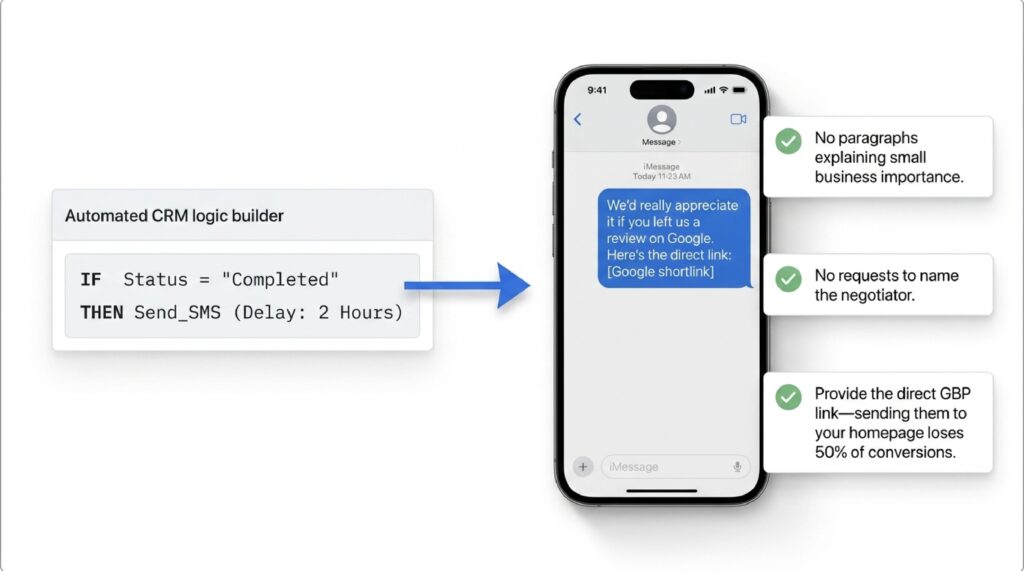
If your agency uses a CRM, build the review request into the completion workflow. An automated email that goes out within 24 hours of a status change to “completed” removes the awkwardness of asking in person and ensures no client gets missed.
How to ask
Make it specific and make it easy. “We’d really appreciate it if you left us a review on Google. Here’s the direct link.” That’s the message. No paragraph explaining why reviews matter to small businesses. No request to mention the negotiator by name and describe their professionalism in detail. Just the ask and the link.
The direct link matters. Sending someone to your website homepage and expecting them to find the Google review button on their own loses half the conversions. Generate your Google review link from your GBP dashboard and send that URL directly.
What to do with the reviews you get
Respond to all of them. Positive reviews get a short, specific acknowledgment. Not “Thank you for your kind words! We really appreciate your support.” Something that references the actual transaction: “Really glad the sale went smoothly after that chain hiccup in October. Good luck in the new house.”
Negative reviews get a calm, factual response that doesn’t argue and doesn’t over-apologise. Other people reading the reviews are not assessing the complaint. They’re assessing how you handle it. An agency that responds to criticism with transparency looks more trustworthy than one with an unbroken run of generic five-star replies.
The number to aim for
There is no official threshold from Google, but in most local markets, an estate agent with more than 50 recent, genuine reviews with active responses is ahead of the majority of competitors. In smaller towns, 30 can be enough to lead the map pack.
Check what the top-ranking agencies in your area have. That’s your working target.
Part 6: The Postcode Problem. How to Rank in Areas You Don’t Have an Office In
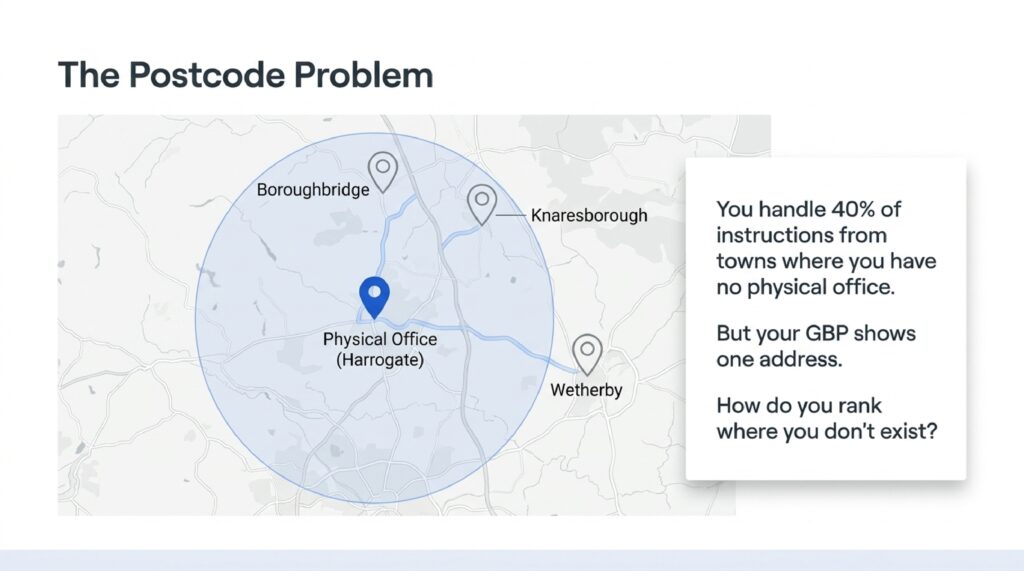
Most estate agents cover more ground than their single office address suggests. An agency in Harrogate might handle 40% of its instructions from Knaresborough, Boroughbridge, and Wetherby. But its Google Business Profile shows one address. Its website homepage targets Harrogate. And when someone in Knaresborough searches for an estate agent, it doesn’t appear.
This is the postcode problem, and it has three workable solutions. The same challenge applies to any service-area business. The local SEO guide for electricians covers it in a comparable trade context if you want to see how the approach translates.
Solution one: location pages
Covered in Part 4, but worth restating here in this specific context. A properly built location page for Knaresborough, with real local content and consistent internal linking, can rank in local searches for that town even without a physical presence there. It won’t outrank an agency with an office on the high street in every case, but it will appear, and appearing is the minimum requirement.
Solution two: Google Business Profile service areas
Your GBP allows you to list a service area covering multiple towns, postcodes, or regions. This doesn’t give you a map pack pin in each of those areas, but it does make your listing eligible to show in “estate agents near me” searches from within those service areas. Set it to match the actual geography you cover, not an aspirational one. Listing half of Yorkshire when you handle three towns looks unconvincing, and Google’s systems have ways of checking.
Solution three: local content that isn’t a service page
A blog post titled “What’s happening in the Knaresborough property market this spring” does several things. It targets a local search term. It gives potential vendors in that area a reason to visit your site. And it signals to Google that your agency has genuine relevance to that location, not just a service area checkbox.
This kind of content works best when it contains real data: actual sold prices, time-on-market figures, a comment on local supply. A post that says “Knaresborough remains a popular choice for buyers seeking a market town feel” is decoration. A post that says “Average sold prices in Knaresborough rose 4.2% in the last 12 months, driven largely by semi-detached stock in the HG5 postcode” is useful.
Useful content gets linked to. It gets shared. And it accumulates authority that a location page sitting on its own cannot build.
What not to do
Do not create a second Google Business Profile with a virtual office address or a PO box in a town where you want to rank. Google’s guidelines prohibit this, and profiles created this way get suspended regularly. The short-term gain is not worth the loss of a primary listing.
Part 7: Schema Markup for Property Listings. What It Is and Why It Pays
Schema markup is code added to your website that tells search engines exactly what type of content a page contains. It doesn’t change what visitors see. It changes what Google understands about what’s there.
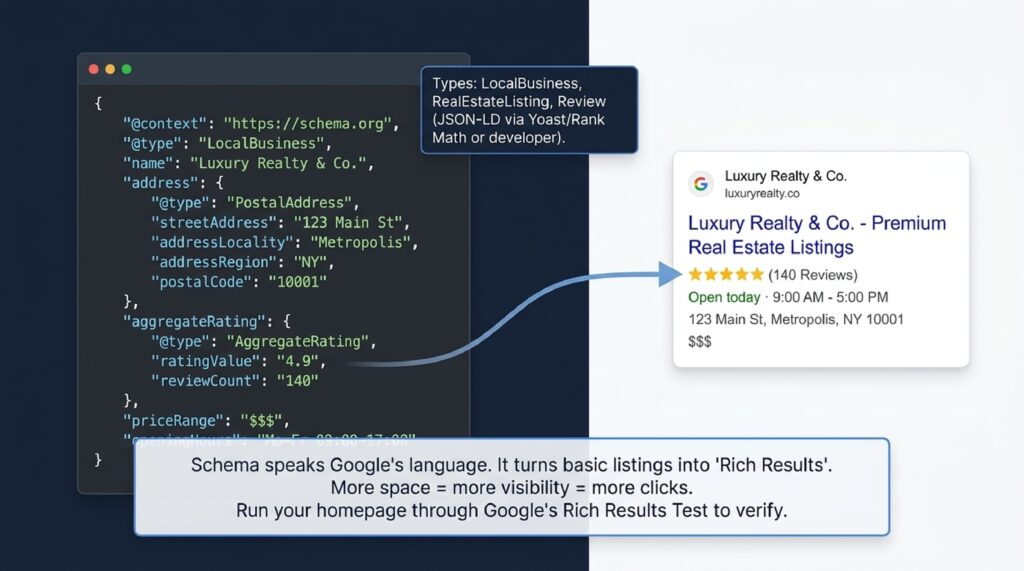
For estate agents, the most useful schema types are LocalBusiness, RealEstateListing, and Review. Adding these correctly can result in your search listings showing additional information directly in Google results: star ratings, address, opening hours, and price ranges, without the user clicking through to your site.
These are called rich results, and they take up more space in search results than standard listings. More space means more visibility. More visibility means more clicks. For a wider look at how search result features are evolving, modern SEO strategies for 2026 covers the structural shifts worth understanding alongside technical implementation.
LocalBusiness schema
This confirms to Google that your website belongs to a real business with a physical address, opening hours, a phone number, and a service area. It should be on every page of your site, typically via the site header or footer so it applies globally.
The fields that matter most: name, address (formatted correctly as streetAddress, addressLocality, addressRegion, postalCode), telephone, openingHours, and url. These need to match your GBP exactly.
RealEstateListing schema
This marks up individual property pages with structured data about the listing: price, number of bedrooms, property type, availability status. Not every property portal supports this rendering fully, but adding it costs nothing and future-proofs pages against Google’s evolving display formats. The schema.org documentation for RealEstateListing shows the full set of available properties if you want to go beyond the basics.
Review schema
If you’re displaying testimonials or reviews on your site, marking them up with Review schema allows Google to show star ratings in your organic search results. This requires reviews to be genuinely hosted on your site, not pulled from Google or Trustpilot via an embed. Reviews that live on third-party platforms can’t be claimed as your own structured data.
How to implement it
Schema is added as JSON-LD code in the head section of your web pages. Most modern CMS platforms (WordPress with an SEO plugin like Yoast or Rank Math, for example) have schema generation built in. You enter the business details in the plugin settings and the code is generated automatically.
If you’re not comfortable editing code, this is a one-hour job for a developer. It’s not expensive and it only needs to be done once unless your business details change.
Google’s Rich Results Test lets you check any URL to see whether schema is present and valid. Run your homepage through it. If nothing appears, the markup is either missing or contains errors.
Part 8: Tracking What Matters. Calls, Directions, and Valuations, Not Just Rankings
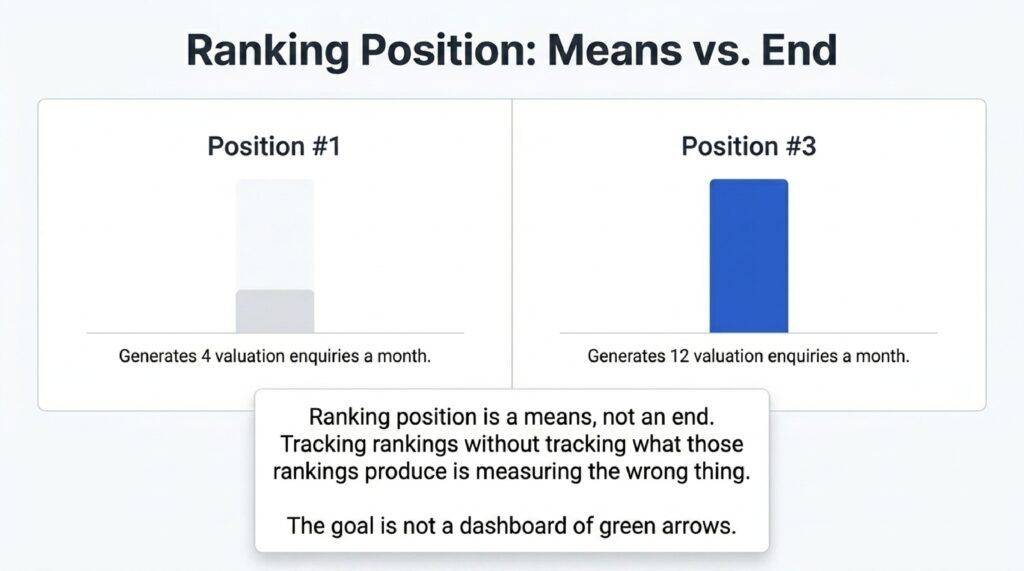
Ranking position is a means, not an end. An agency in position three that generates twelve valuation enquiries a month is performing better than an agency in position one that generates four. Tracking rankings without tracking what those rankings produce is measuring the wrong thing.
What to track and where
Google Business Profile Insights shows calls made directly from your listing, direction requests, and website clicks, broken down by time period. Check this monthly. A drop in calls despite a stable ranking suggests something about the listing itself has changed: a photo removed, a review left unanswered, a competitor’s listing suddenly improved.
Google Search Console shows impressions (how many times your site appeared in search results), clicks, and average position for specific queries. Set it up with filters for your target locations and check the queries that are driving clicks to each page. If a location page for Knaresborough is getting 200 impressions a month but only 4 clicks, the title tag or meta description needs work. The page is appearing but not compelling anyone to click.
Google Analytics (GA4) tracks what visitors do after they arrive. Which pages do they land on. How long do they stay. Where do they exit. Most importantly: do they complete a valuation form or click to call. Set up conversion tracking for your key actions. Without it, you have traffic numbers and nothing else.
The three numbers that actually matter
Valuation requests coming directly from search (not from Rightmove, not from a portal referral). Calls originating from the GBP listing. Direction requests to the office. These three numbers tell you whether your local SEO is producing business, not just visibility.
Review these monthly. Note what changed in the months where numbers moved up or down. A competitor launched an aggressive review campaign. You published three location pages. You updated your GBP photos. Connecting actions to outcomes is how you build a repeatable process rather than a collection of one-off tasks.
A note on ranking tools
Paid ranking trackers like BrightLocal and SE Ranking are useful for monitoring position over time in specific locations, particularly in the local map pack where standard rank trackers often fall short. They’re worth the cost if you’re managing SEO for multiple offices or multiple clients. For a single-office agency doing this work in-house, Google Search Console and GBP Insights together give you enough data to act on without paying for additional tools. For a comparison of the broader tracking and research tool landscape, the SEMrush alternatives roundup covers the options at different price points.
The goal is not a dashboard full of green arrows. The goal is more valuations booked. Keep that in view.