


A useful online marketing audit is not a checklist of things that could be improved. Every site has things that could be improved. A useful audit answers three questions: what is holding growth back right now, what is working and should not be touched, and what is the real priority rather than the thing that merely feels urgent?
Listen to the article summary
A short version of the audit logic: fix measurement, technical blockers, and conversion issues before scaling traffic.
Download the diagnostic blueprint
Keep a practical PDF guide for auditing your marketing channels in the right order.
Download free PDFAccording to HubSpot, 63% of businesses say generating traffic and leads is their main marketing challenge. But when their channels are audited, the real problem is rarely just lack of traffic. More often, the traffic they already have does not convert, or they are investing in the wrong channels for their current stage. The audit is the process that separates the symptom from the diagnosis.
There is also a practical reason to audit proactively, not only when something breaks: businesses that establish a quarterly audit rhythm tend to see higher marketing ROI than those with no recurring review process. The point is not to audit for the sake of reporting. The point is to catch drift before it becomes expensive.
Marketing audit prioritizerOpen the tool to order findings by impact, effort, and business risk. Open tool
Your prioritized action plan
Based on impact, effort, and business risk
Golden rule
Fix what blocks measurement, indexation, or conversion. Then scale.
Tracking and measurement
Tracking issues make it impossible to know what is working and what is not.
Do this first
Without reliable data, everything else is a guess.
Risk of ignoring itBad decisions, wasted spend, and invisible opportunities.
Technical SEO
Problems that may be limiting your visibility in search engines.
Do this second
Without a solid technical base, your content will struggle to compete.
Risk of ignoring itOrganic traffic and budget lost to preventable blockers.
Content and structure
Issues that dilute relevance and weaken rankings.
Do this third
Aligning content with intent and making it unique creates an edge.
Risk of ignoring itWeak rankings and traffic that does not convert.
UX / Conversion and authority
Improvements that convert more traffic and strengthen the domain.
Do this after
Compound results and build authority over the medium term.
Risk of ignoring itConversion stagnation and difficulty competing.
Week 1: Diagnosis and base
Week 2: Quick technical fixes
Week 3: Content and structure
Week 4: Conversion, authority, and paid
Before you start: define what you want to measure

A local service business that wants more calls measures success very differently from an ecommerce store trying to lower its customer acquisition cost. Before you open any tool, you need three numbers: how much monthly organic traffic you have now, how many of those visitors become leads or customers, and how much it costs to acquire each one.
Download the marketing audit workbook
Use this spreadsheet to track findings, score priorities, follow the audit checklist, and manage your 30-day action plan.
If you do not have those numbers, the first part of the audit is getting them. Google Analytics 4 and Google Search Console are the required starting point for any business with an online presence. If they are not configured, that is already the first finding of the audit.
Block 1: analytics infrastructure audit
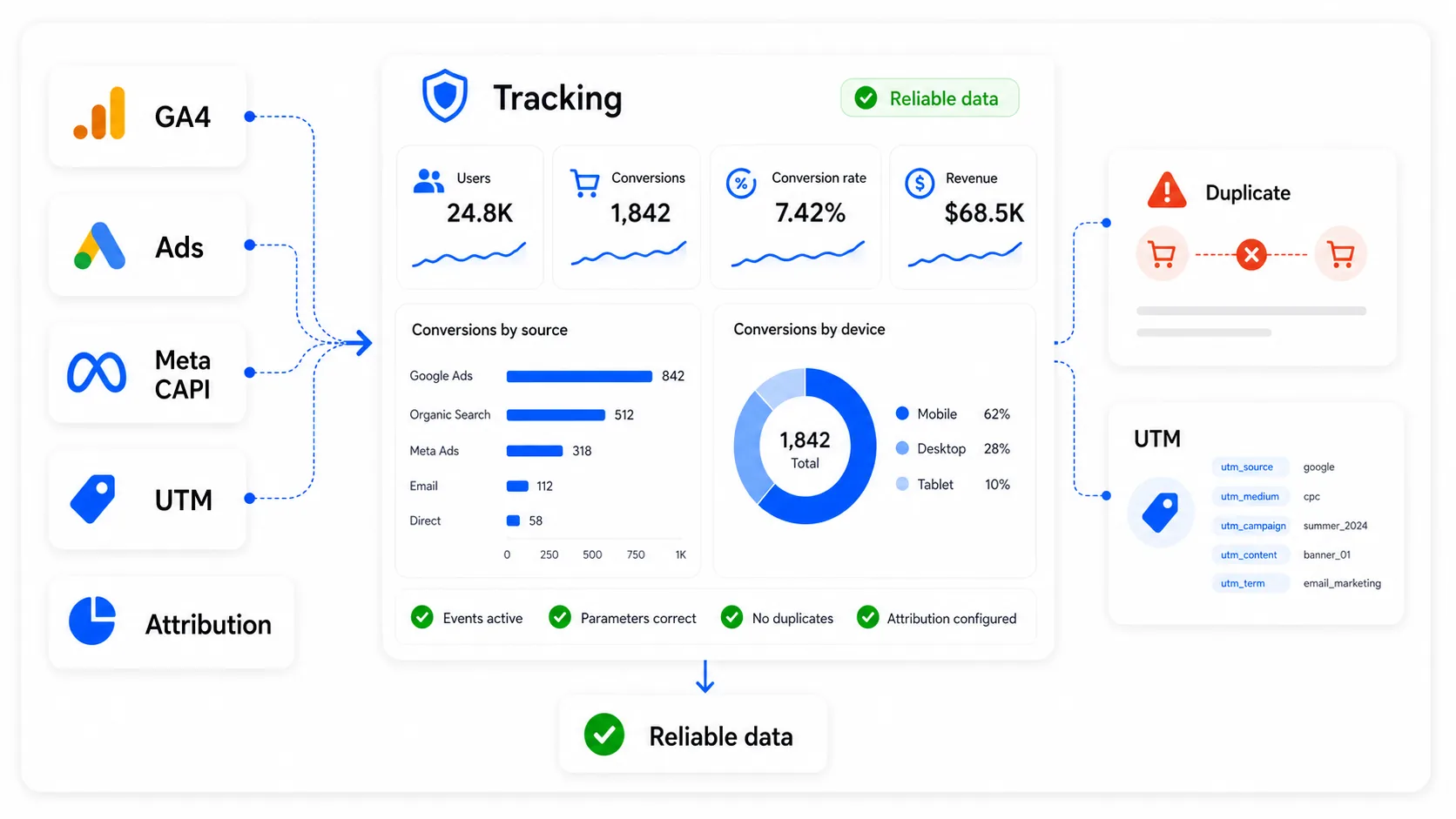
This block comes before the technical audit.
Optimizing any channel with corrupted data is worse than not optimizing at all, because it leads to decisions based on false positives. If conversion tracking is misconfigured and your Google Ads account reports twice as many conversions as actually happened because of duplicate firing, the campaigns that look most profitable may be the ones losing the most money. Every later diagnosis only matters if the data behind it is reliable.
Start with conversion tracking. Confirm that conversion tags fire at the right moment: on the purchase confirmation page, on form submission, on calls, and only once. Use Google Tag Assistant to check for duplicate triggers. For ecommerce, tracking should capture transaction value and a unique order ID. Without that, the ROAS you see in Google Ads is an estimate, not a reliable business number.
Then check duplicate counting across platforms. If you use both the Meta Pixel and server-side Conversions API, you need matching event IDs for deduplication. Without that control, Meta can count the same sale twice and optimize campaigns around inflated data. In practice, the algorithm may push budget toward audiences that appear to convert well but are not generating the sales the dashboard reports.
Review UTM consistency. If UTMs do not follow a consistent taxonomy across source, medium, and campaign, traffic ends up misattributed. A meaningful share of visits can appear as direct traffic when it actually came from email, social, or paid campaigns that were not tagged correctly. That makes it impossible to know which channel is working.
Finally, look at attribution. Last-click attribution is weak for any business with a decision cycle longer than one day. If someone sees a social ad, searches the brand days later, and then buys, last click gives all credit to branded organic search and none to the ad. Upper-funnel channels such as display, video, and informational content are then systematically undervalued and underfunded.
Only when the analytics infrastructure is verified does it make sense to audit the channels that depend on those numbers.
Block 2: technical SEO audit
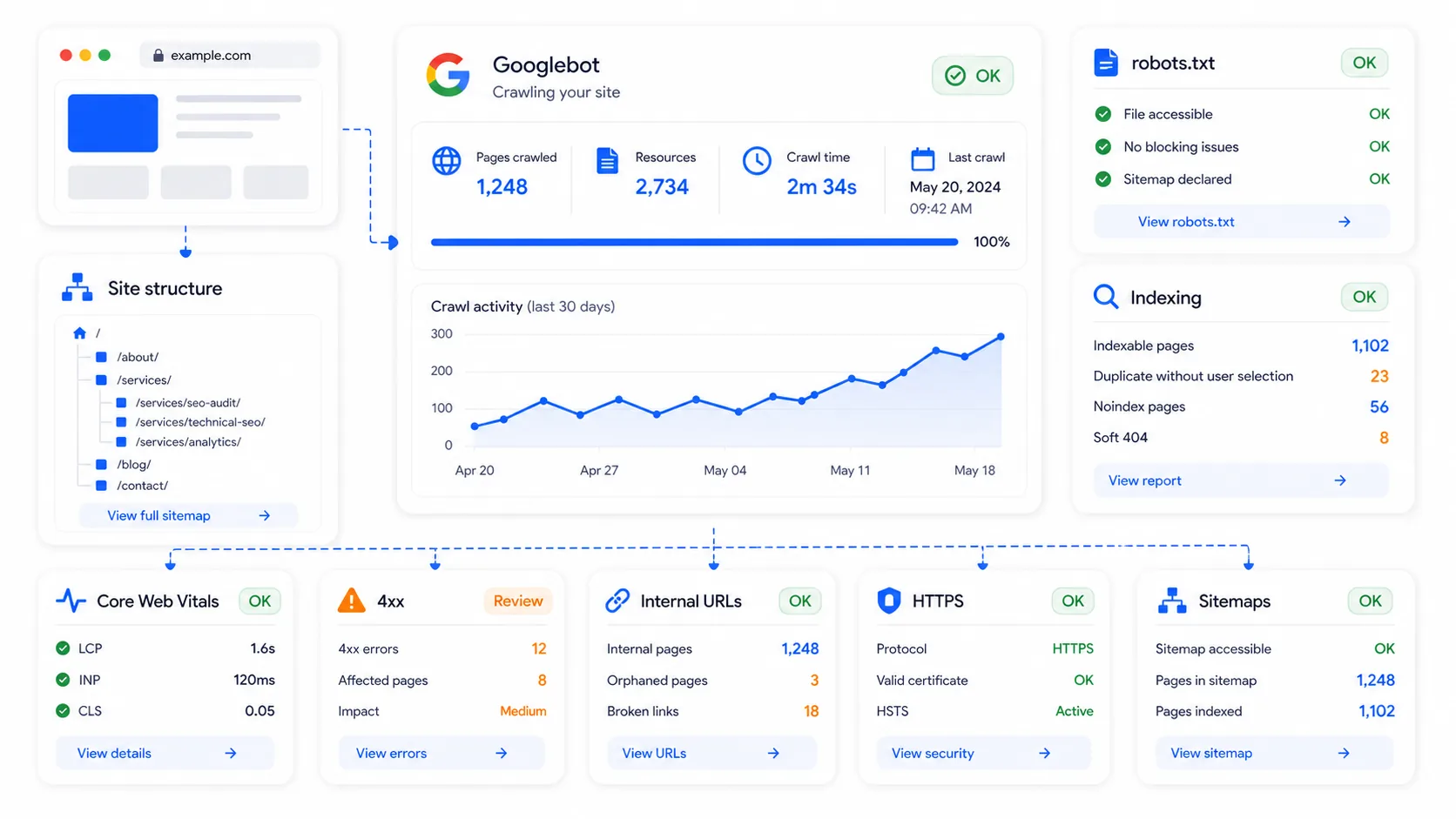
Once the data is trustworthy, the next step is confirming that Google can crawl and index the site correctly. If there are problems here, everything built on top of the site performs below its potential.
Start with crawlability and indexation. A badly configured robots.txt file can block entire sections of a site without anyone noticing. A robots.txt tester verifies this quickly. Also compare how many pages exist with how many pages are indexed in Search Console. A large gap often points to duplicate content, accidental noindex directives, or technical errors.
Then check speed and Core Web Vitals. For traditional rankings, an LCP above 2.5 seconds is an active negative signal. For AI visibility, speed also matters because fast, clean pages are easier to crawl and parse. PageSpeed Insights gives the diagnosis and the underlying causes.
Review redirect chains. Every additional hop in a redirect chain adds latency and can dilute accumulated equity. Find A-to-B-to-C patterns and reduce them to A-to-C directly.
Check basic trust signals. HTTPS on all pages, a visible contact page, and privacy/legal pages are not decorative. They are baseline trust signals for users, search engines, and AI systems.
A dedicated SEO audit tool can automate this diagnosis and prioritize findings by impact.
Block 3: content and rankings
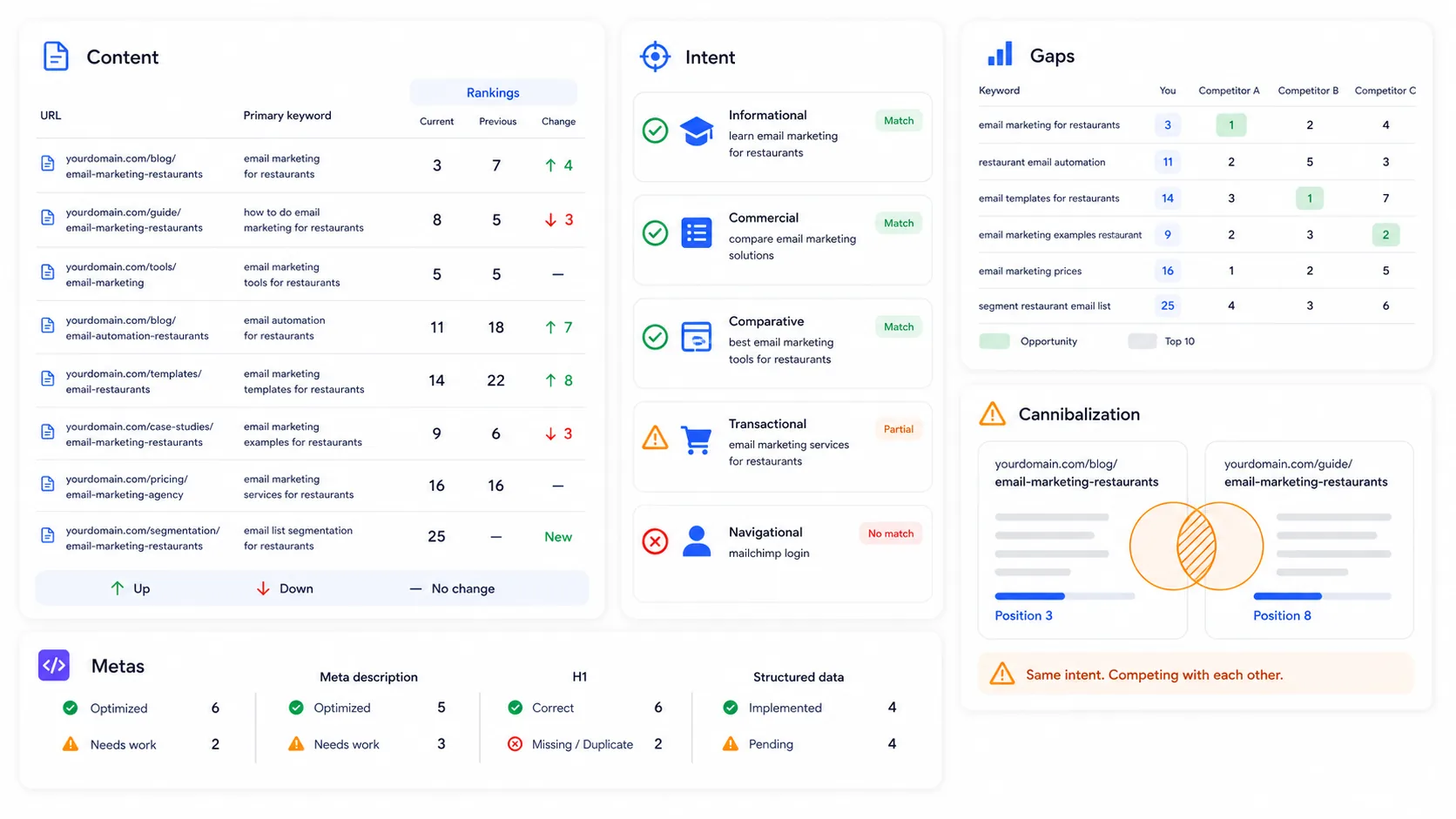
The most common issue in this phase is that existing pages do not answer the real intent behind the search.
A page about “accounting services” aimed at mid-sized companies will not rank well for “bookkeeping for freelancers” just because the keywords look related. They are different intents, and Google treats them that way. Every important URL needs one clearly defined intent and content that satisfies it.
Review current rankings and their evolution. A gradual decline with no visible technical change usually means competitors have improved topical coverage or the algorithm has adjusted its understanding of the search intent. A rank tracker shows that evolution over time, not just a one-day snapshot.
Look for gaps against competitors. Keywords where competitors rank and you do not are often the most direct opportunities. A gap on a keyword with real demand and manageable competition is one of the most actionable findings in a content audit. A competitor research tool maps this systematically.
Check cannibalization. When two pages on the same site compete for the same keyword, authority is split and neither page performs as well as it could. This is a quiet problem: traffic declines slowly, and the fix is often consolidation rather than creating more content.
Review meta titles and descriptions. Pages with duplicated or poorly aligned titles lose CTR even when they rank. Every important page needs a unique title, with the main keyword near the beginning when possible. A meta generator can speed this up when many pages need updates. For the strategic angle, the guide to meta tags and SEO keywords in 2026 explains what has changed.
Block 4: UX and conversion
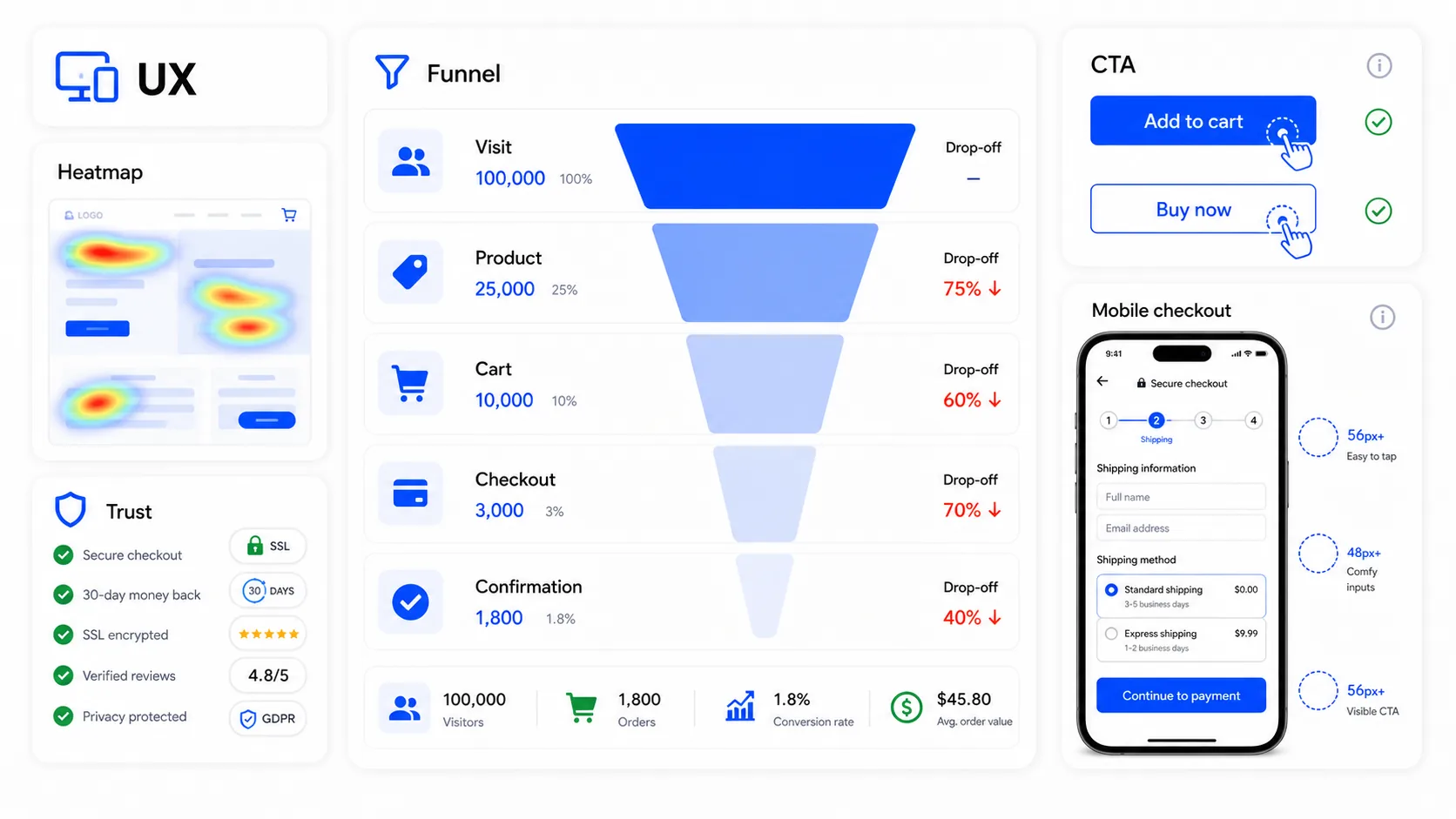
A site can have no technical errors and still lose most visitors before anyone takes action. A form with eight fields when three would be enough, a buy button hidden below the fold, or a checkout that forces account creation before payment will not appear in a crawlability audit.
Use GA4 funnel explorations for the key paths: visit, product or service page, cart or lead form, checkout or submission, confirmation. Each step shows where people leave. If 70% abandon between cart and payment, the problem is there, not in SEO. Scaling traffic into that funnel only scales the loss.
Use heatmaps and session recordings. Microsoft Clarity is free and enough for many audits. It shows how far users scroll, which elements generate rage clicks or dead clicks, and where people abandon. The difference between how a designer imagined the page would be used and how people actually use it is often revealing.
Review forms. Every extra field reduces completion. Ask how many fields the business truly needs and how many exist because someone once wanted that data. Those are different things.
Check trust signals at decision points: verified testimonials, client logos, security signals on checkout pages, relevant proof on service pages. They are not decoration. At the moment of decision, they reduce cognitive friction and directly affect conversion.
This block also connects back to SEO. Pages with poor engagement can send weak behavioral signals. Improving UX often improves both the user experience and the quality signals search engines interpret from the page.
Block 5: authority and backlinks

Not every link helps. Some links are irrelevant to the topic of the site, some are low quality, and some may actively harm performance if they come from aggressive link building patterns in the site’s history.
Review the backlink profile: how many unique domains link to the site, what their authority distribution looks like, and whether there are patterns Google could interpret as manipulation, such as many low-quality domains created in a short period or repeated exact-match anchor text across unrelated sites. A backlink explorer helps with this diagnosis.
Look for unlinked brand mentions. If a site already mentions the brand but does not link to it, asking for the link usually has a much higher response rate than cold outreach because the relationship already exists. In 2026, unlinked mentions also matter for AI visibility because models use brand references as entity signals.
Measure the gap against competitors. If the pages competing for your target keywords have significantly stronger backlink profiles, content alone may not displace them. The audit has to quantify whether the gap is realistic to close in the short term or requires a longer authority strategy.
Block 6: internal linking
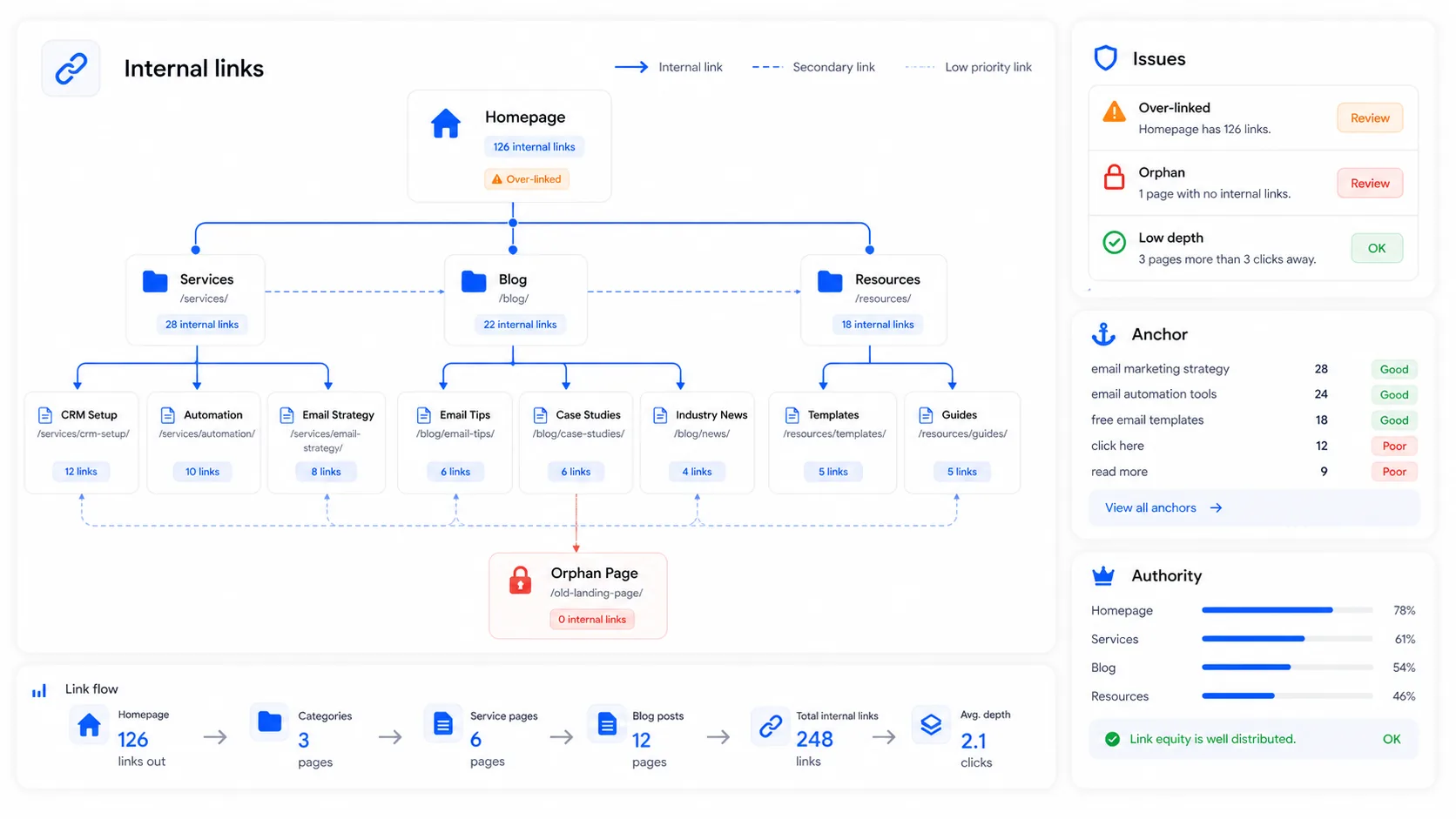
Internal linking is often the easiest channel to improve because it does not depend on anyone outside your site.
Find orphan pages. These are pages with no internal links pointing to them. Search engines discover them with difficulty and treat them as low priority because no other part of the site signals that they matter. If a page matters to the business, it needs internal links from related pages.
Check whether authority is distributed unevenly. If almost every internal link points to the homepage while product, service, or category pages receive very few links, those money pages are underfunded in internal authority. The structure should reflect the site’s real business priorities, not just the architecture that was easiest to build.
Review anchor text. “Click here” and “learn more” do not transfer semantic context. The anchor should describe the destination page and, when natural, include the target keyword. An internal links tool can map current distribution and detect these patterns.
Block 7: AI visibility
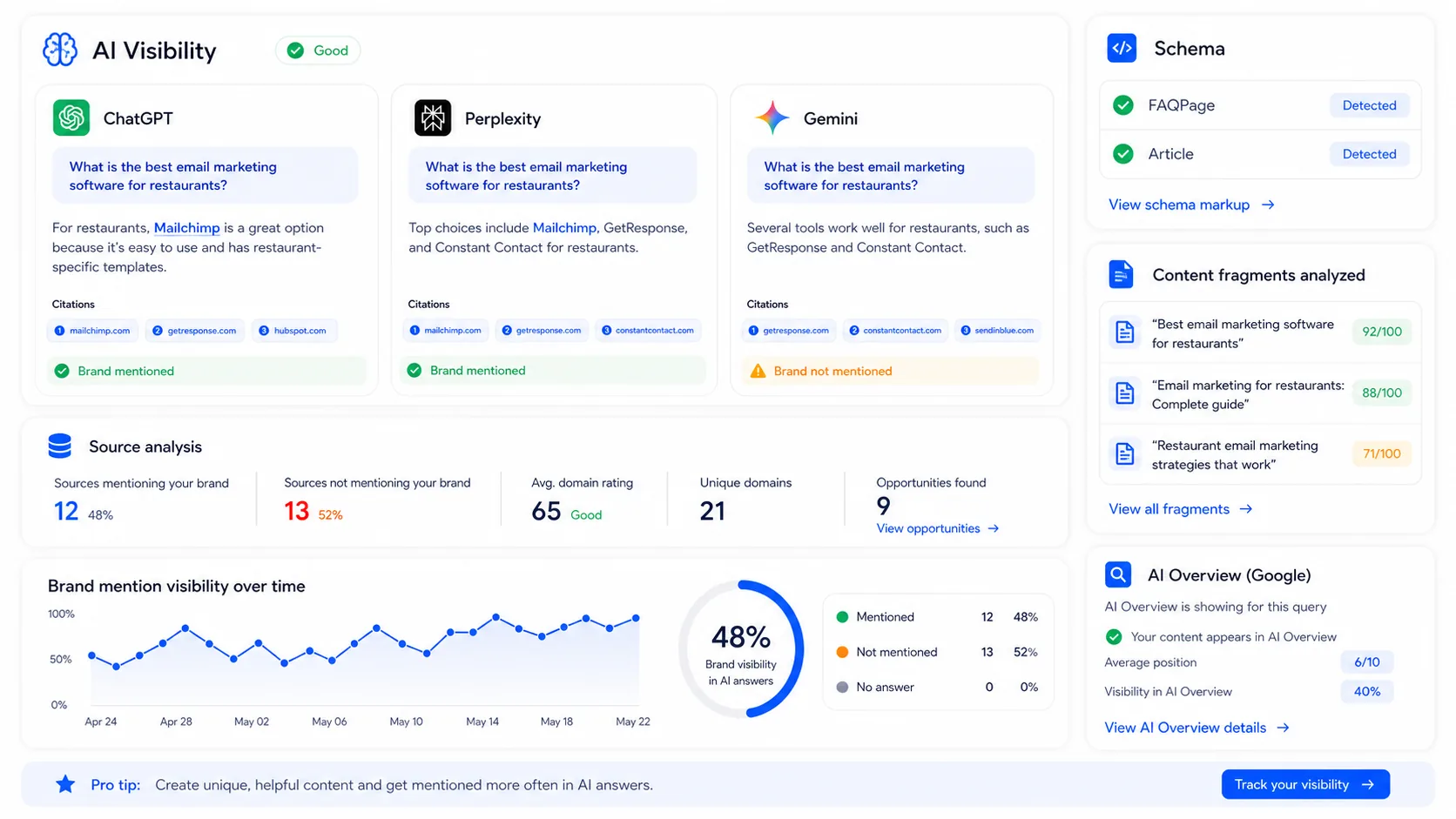
Ranking in Google and appearing in AI answers are no longer the same thing. A page can rank well in organic search and still be absent from AI answers. The opposite can also happen: a page with modest traditional rankings can be cited often because its content is structured in a way that is easy for models to extract.
Start by checking how AI systems describe your brand. Ask ChatGPT, Perplexity, and Gemini: “What is [brand]?” and “What are the best options for [category]?” The answers show whether the model knows the brand, what attributes it associates with it, and whether it appears when someone asks about the category. A brand monitoring tool can automate this over time.
Review content structure. LLMs do not treat pages the same way humans do. They often extract short passages. A monolithic article is less likely to be cited than one where each section answers a specific question independently.
Check schema markup. Many sites still have weak or incomplete structured data. At minimum, important pages should use Article with a verifiable author where relevant, Organization or LocalBusiness where appropriate, and FAQPage only when the page actually contains FAQs. A schema generator creates the JSON-LD needed, and an AI optimization tool can evaluate what would improve citation probability on each page.
For the zero-click context behind this shift, the guide to zero-click strategies explains the logic.
Block 8: local SEO (only if you serve customers in a geographic area)
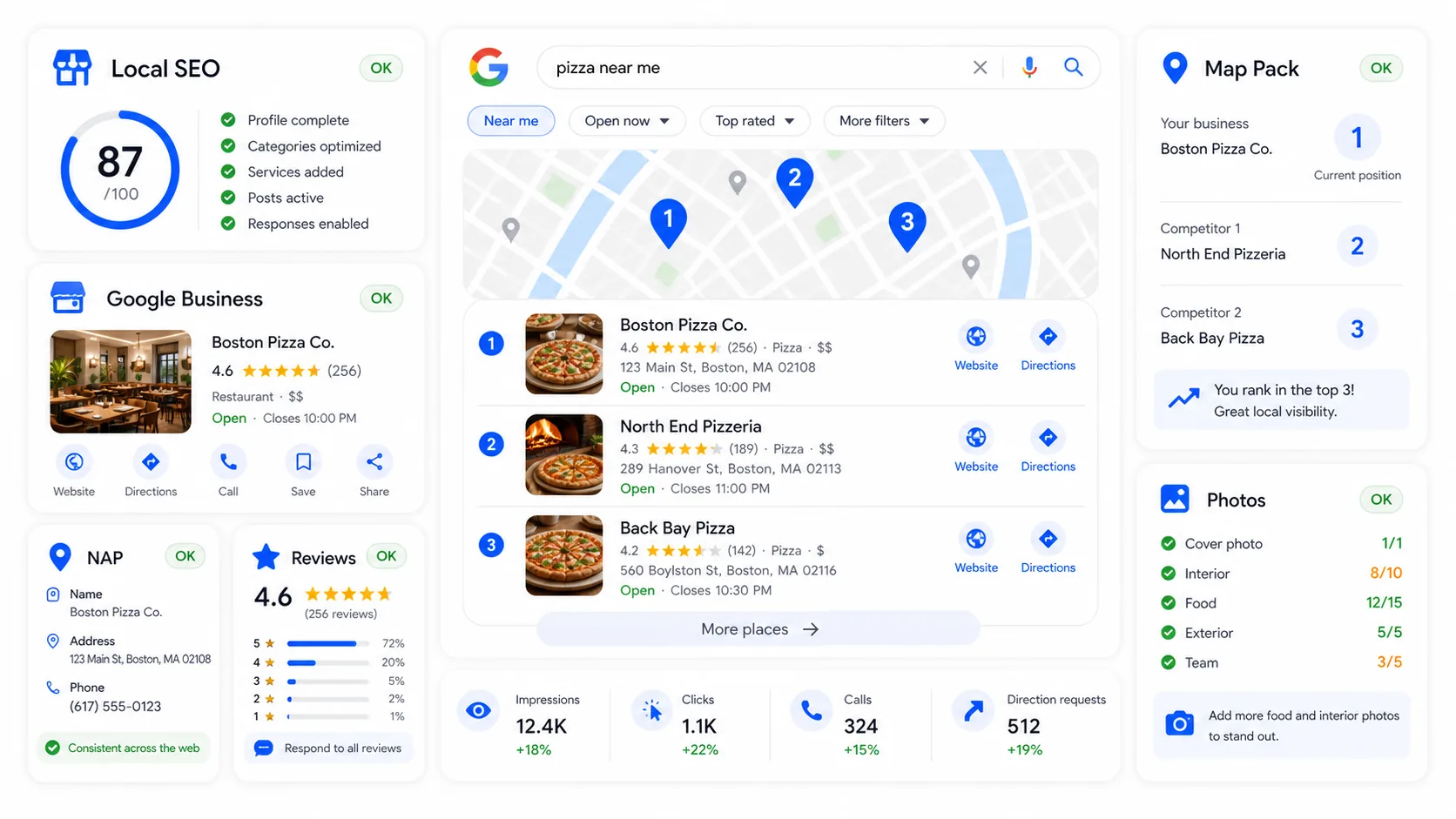
For local businesses, this channel can convert faster than almost any other organic source. Searches with local intent often happen close to a buying decision.
Start with Google Business Profile. The business name should be accurate, the address should match the website, categories should be correct, hours should be updated, photos should be current, and the description should clearly explain the service. An incomplete profile loses Map Pack visibility to competitors that simply have better-maintained profiles.
Check NAP consistency. Name, address, and phone number should match across Google Business Profile, the website, and relevant directories. Small discrepancies fragment trust signals. A local SEO tool can detect these inconsistencies.
Review reviews. A business with recent, active reviews often has an advantage over a competitor with more total reviews but no recent activity. The three indicators that matter are review count, average rating, and whether negative reviews receive thoughtful responses.
For a realistic view of what budget can buy, the local SEO cost case study shows actual numbers.
Block 9: paid channels
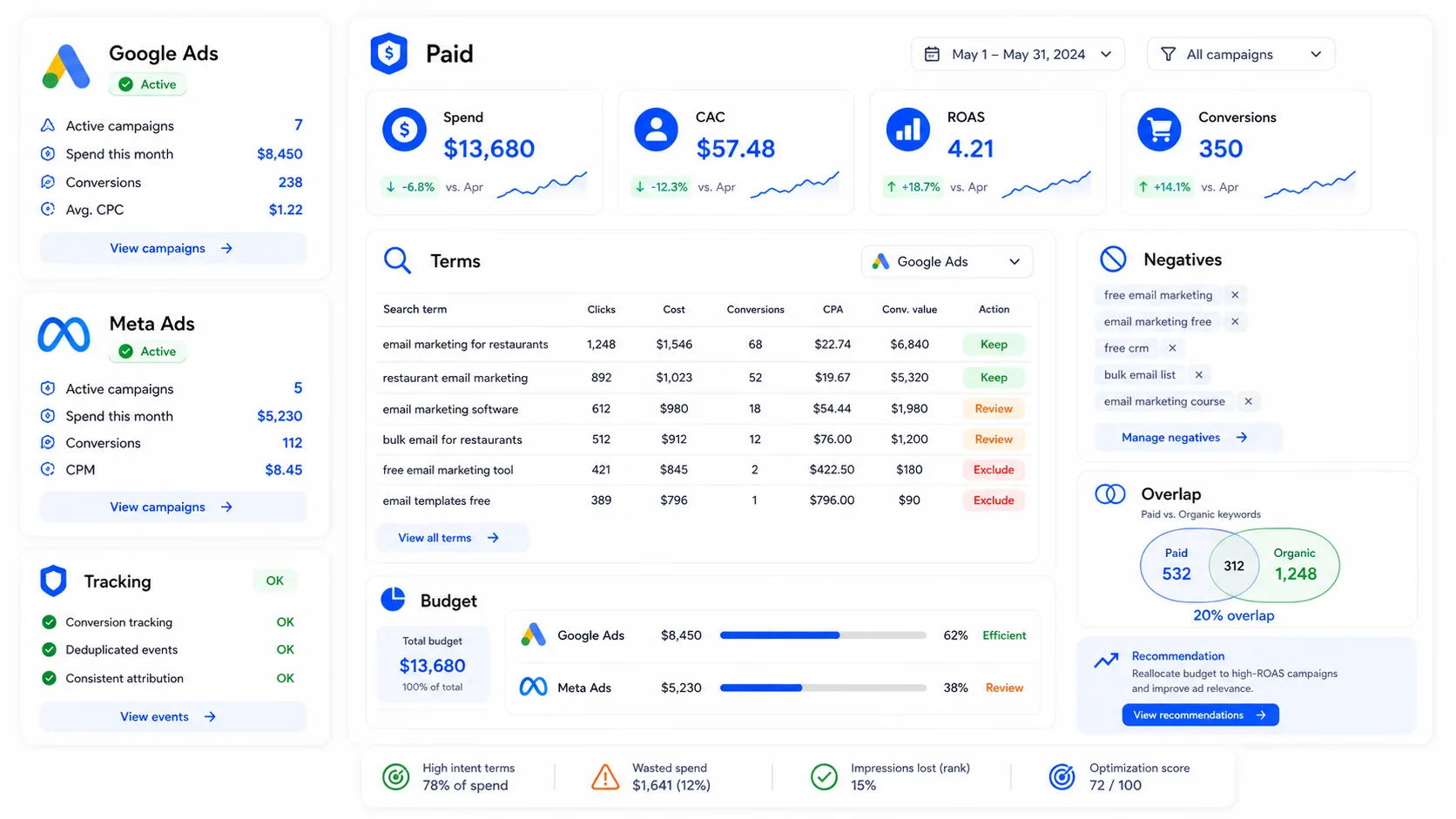
This block comes near the end because auditing paid media before analytics and UX often leads to the wrong diagnosis. If you see high CTR and low conversion rate, the problem might be the ad. Or it might be the landing page. Without reviewing UX first, you cannot know.
Verify tracking inside ad accounts. A correctly configured GA4 setup is not enough. Each paid platform needs its own conversion tracking verified. Without clear conversion goals in Google Ads and Meta, automated bidding algorithms optimize toward a vague target.
Measure real CAC, not CPC. A campaign with low CPC and poor conversion can cost more per customer than one with higher CPC and better conversion. The number that matters is customer acquisition cost, not the ad platform’s vanity metrics.
Review the search terms report in Google Ads. This report shows the real queries that triggered your ads. Broad match without a disciplined negative keyword list can generate irrelevant traffic that spends budget without converting. One hour reviewing this report and adding negatives can improve return more than changing ad creative.
Check overlap with organic search. If the site already ranks on page one for a keyword, paying for ads on that same keyword may have low marginal return. That budget may work better on keywords where organic visibility is weak.
In what order should you fix the findings?
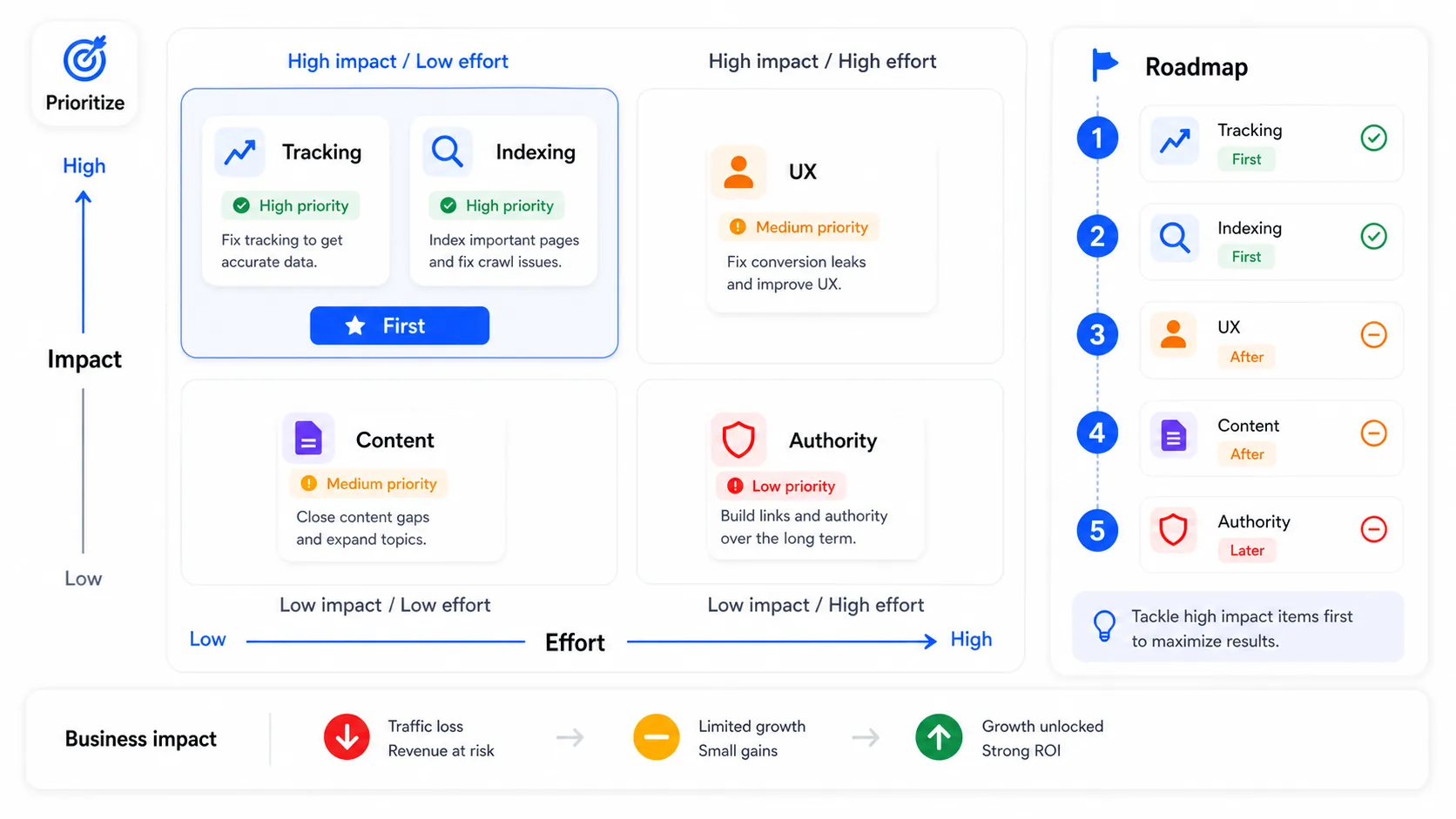
A complete audit produces problems in every block. Trying to fix all of them at once does not work. It spreads resources too thin and makes it impossible to know which change produced which result.
Prioritization should combine two variables: likely business impact and implementation effort. High impact, low effort comes first.
Fixing a broken conversion pixel can take an hour and immediately improve every campaign decision. Restructuring the site architecture to improve Core Web Vitals may take months. The order is not a matter of taste.
The usual sequence is analytics and tracking first, because everything else depends on reliable data. Then technical problems that block crawling or indexation. Then existing pages with traffic where UX is limiting conversion, because those changes can produce results in weeks. After that, new content opportunities. Finally, authority building and external visibility, which are slower but compound over time.
How often should you run one?
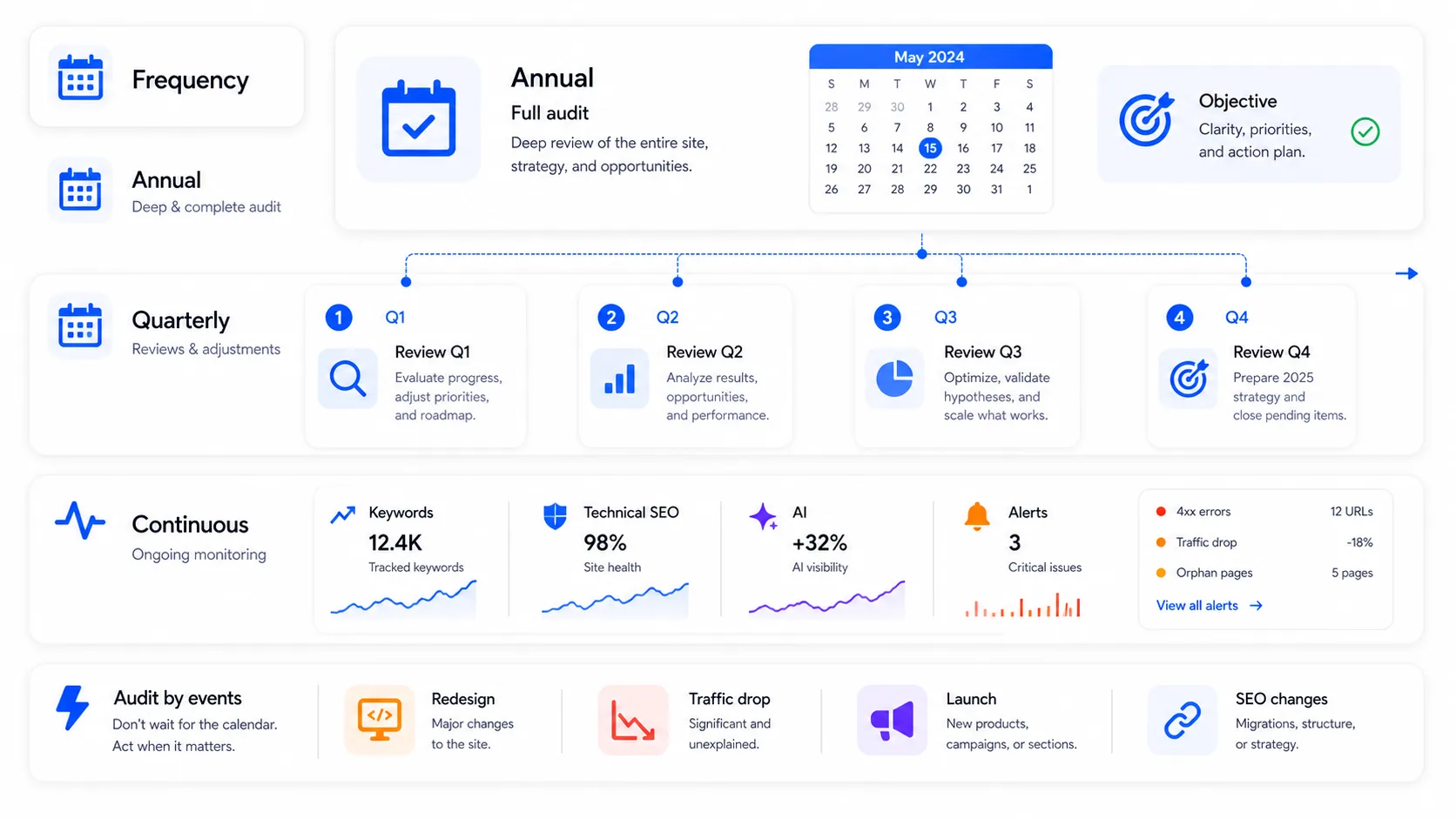
Run a complete audit once a year, or whenever something major changes: a large algorithm update, a site redesign, an unexplained traffic drop, a new channel, or a major shift in business goals.
Ongoing monitoring is different. Key rankings, new technical errors, conversion tracking, paid search waste, and AI visibility need constant monitoring, not annual review. That is what tracking tools are for. They serve a different purpose than a full audit.
What separates sites that improve consistently from those that stall is rarely budget alone. It is how often they look at the data, whether they understand what the data means, and whether they act on findings in the right order.